PETdisk Video
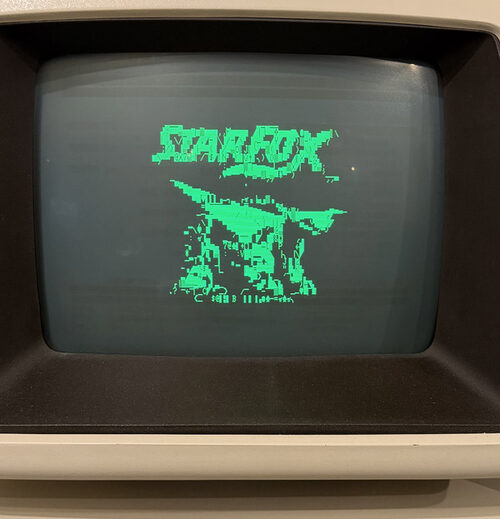
PETdisk Video lets you search YouTube on a Commodore PET and watch the videos on its screen in PETSCII. A PC does the heavy work: it gets the video, converts it to PETSCII characters while it plays, and streams it to the PET through a PETdisk MAX network drive. The PET itself only reads the stream from the IEEE-488 port and puts the characters on the screen.
Everything is controlled from the PET keyboard: search, pause, seek, loop a part of the video, and adjust brightness, contrast, gamma and dithering. In audio mode the PET plays the sound of the video as 1-bit audio through its speaker, with a slow PETSCII slide show of the pictures.
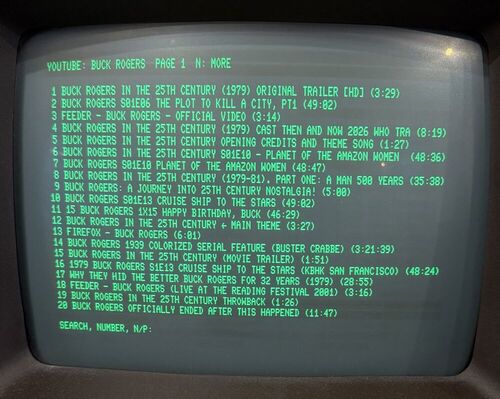
The PC side is a small server that answers the PETdisk MAX exactly like an ordinary network drive, so the PETdisk MAX runs its stock, unmodified firmware. One of the files it serves is a video stream that never ends and is made while the PET reads it.
What you need
- A Commodore PET or CBM with BASIC 2 or BASIC 4 and at least 16 KB of RAM. There is a version for 80-column machines (8032, 8096, 8296) and one for 40-column machines (2001N, 3032, 4032).
- A PETdisk MAX on the IEEE-488 port, on a 2.4 GHz WiFi network.
- A PC on the same network to run the server, with Docker or Python.
PETdisk Video is an independent project. It is not associated with the PETdisk MAX, its author or bitfixer.
Get it
The source, the ready-built PET programs, setup instructions and a detailed description of how it all works are on GitHub: github.com/arttu76/petdisk-video.